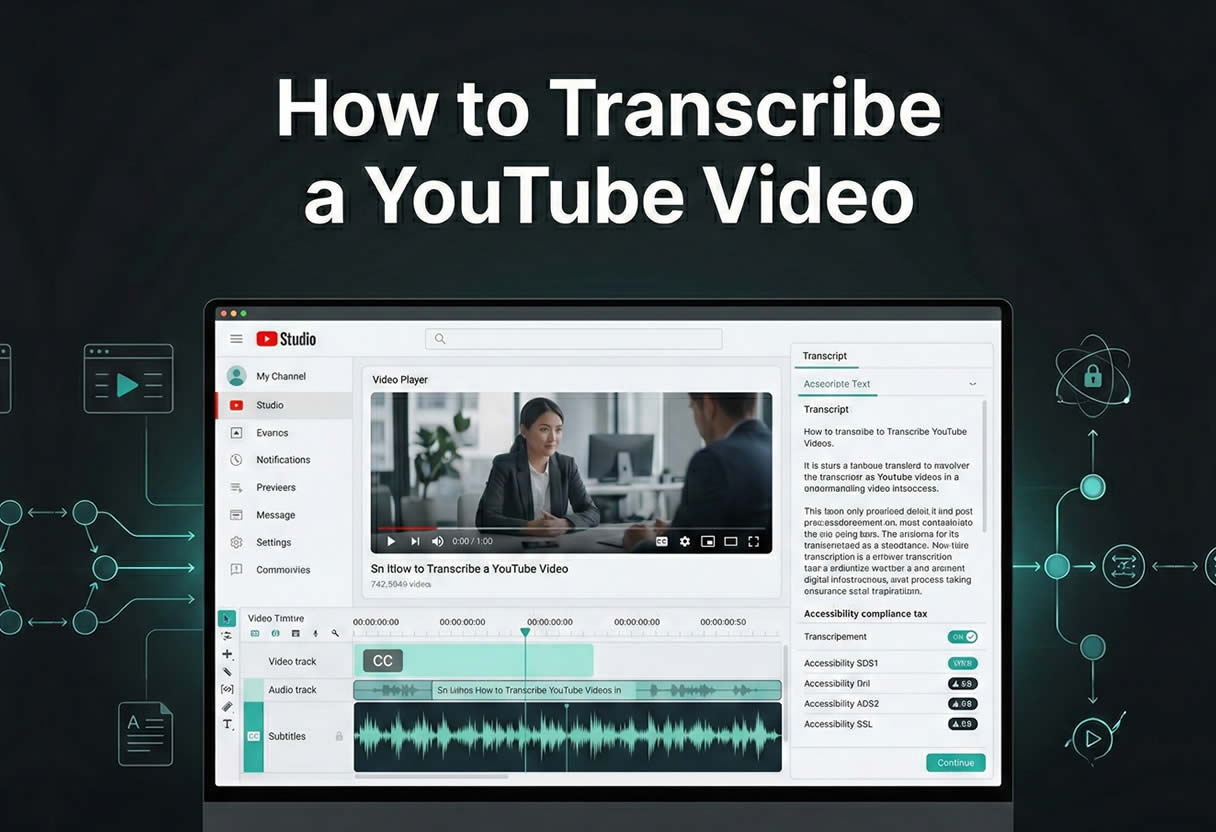
- Professional YouTube transcription is an infrastructure system that impacts accessibility compliance, legal exposure, content reuse, localization, and search performance.
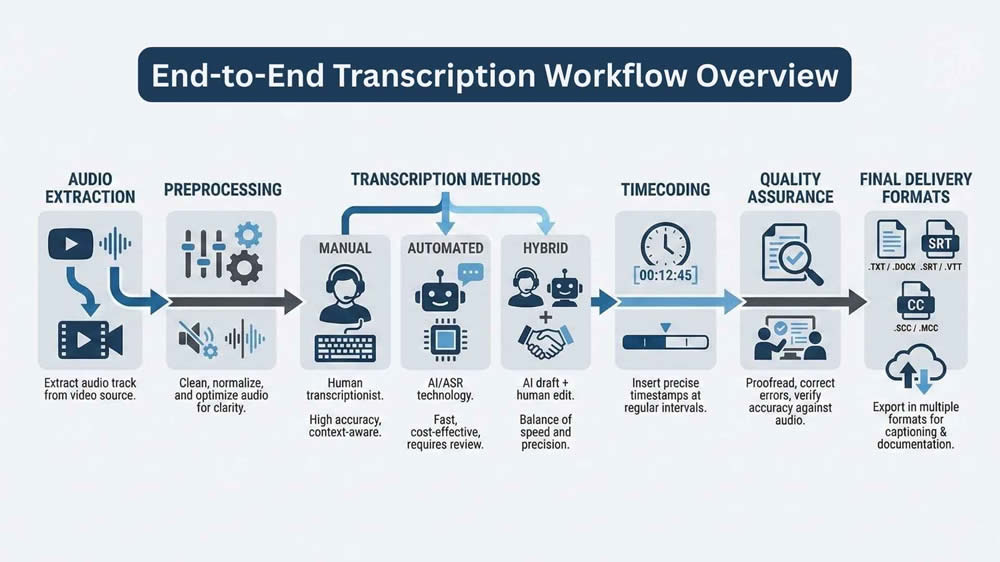
- High-quality transcripts depend on defined transcription styles, clean audio extraction and preprocessing, appropriate ASR or hybrid methods, and formal quality assurance.
- Scalable transcription workflows require automation, audit trails, precise timecodes, secure data handling, and output formats compatible with publishing and localization systems.
When I approach YouTube transcription professionally, I do not treat it as a clerical task or a mechanical conversion of speech to text. Transcription is an infrastructure decision that affects accessibility compliance, content reuse, localization pipelines, search visibility, and in some cases, regulatory exposure. Every choice made early in the process propagates downstream, whether that is audio extraction quality, timecode resolution, or transcription style. This is why experienced teams treat transcription as a system, not a step.
This article is written for professionals who already operate in video, post-production, accessibility, localization, or data pipelines. I am assuming familiarity with subtitles, ASR systems, and content workflows. My goal here is to document how I design and execute YouTube transcription workflows that scale, remain auditable, and produce deliverables that stand up to professional scrutiny. This is not about shortcuts or consumer tools. It is about building reliable transcription processes that clients can depend on.
Legal and Operational Baselines
Content Ownership and Usage Rights
Before transcription begins, I always confirm content ownership and usage rights. Public availability on YouTube does not imply permission to transcribe, redistribute, or commercialize the content. If I am working with first-party content, such as a brand’s own channel or a client-owned video, this is straightforward. Problems arise when teams attempt to transcribe third-party videos for research, training data, or SEO reuse without explicit rights.
From an operational standpoint, YouTube’s Terms of Service also matter. Automated downloading or scraping can violate platform rules if performed at scale without API authorization. In professional environments, I recommend documenting the legal basis for transcription, including fair use assessments where applicable. This documentation becomes essential if the transcript is repurposed externally or integrated into commercial products.
Accessibility and Regulatory Compliance
Transcription frequently intersects with accessibility obligations. If captions are being produced to meet accessibility requirements, then accuracy thresholds, formatting conventions, and timing constraints are not optional. Regulatory frameworks such as WCAG 2.1, Section 508, and regional accessibility laws impose specific expectations around caption completeness and synchronization.
Operationally, this means transcription teams must define acceptance criteria early. For example:
- Maximum allowable error rate
- Treatment of non-speech audio
- Speaker identification requirements
- Caption latency and alignment tolerances
Ignoring these details leads to rework and compliance risk. In regulated environments, transcription is not just content production. It is a compliance artifact.
Defining Transcription Requirements
Transcription Style and Editorial Scope
One of the most common failures I see is teams skipping the transcription style definition. Transcription is not a single output category. At a minimum, I distinguish between verbatim, clean read, and edited transcripts. Each serves a different purpose and carries different costs and accuracy implications.
Verbatim transcription captures every utterance, filler word, and false start. Clean reading removes disfluencies while preserving original meaning. Edited transcription restructures spoken language into readable prose. Choosing incorrectly leads to misalignment with client expectations. I always document the editorial scope before audio is processed, especially when automated systems are involved.
Technical Output Specifications
Beyond editorial style, technical specifications define whether a transcript is usable downstream. These specifications typically include:
- Output formats such as SRT, VTT, JSON, or DOCX
- Timestamp granularity at sentence, phrase, or word level
- Speaker labeling requirements
- Non-speech annotation conventions
For professional workflows, I also define encoding standards, file naming conventions, and metadata fields. Transcription that lacks a consistent structure becomes difficult to integrate into CMS systems, translation platforms, or QA tools. Precision here saves hours later.
Audio Extraction from YouTube
Extraction Methods and Tooling
High-quality transcription starts with clean audio extraction. I primarily use yt-dlp for professional workflows due to its reliability and granular control over formats. This allows me to extract the highest-quality audio stream available without unnecessary video payload. When metadata integration is required, I combine this with YouTube Data API calls to retain contextual information.
In batch environments, extraction is scripted and logged. This ensures traceability and repeatability. I avoid browser-based download tools entirely in professional settings, as they introduce variability and are difficult to audit.
Audio Preprocessing for Transcription
Raw extracted audio is rarely optimal for transcription. Before passing files to ASR systems or human transcribers, I preprocess audio using FFmpeg. This typically includes normalization, channel mixing, and resampling to a consistent rate.
Common preprocessing steps include:
- Converting stereo to mono where appropriate
- Normalizing loudness levels
- Removing extended silence segments
- Splitting long files for batch processing
These steps improve recognition accuracy and reduce processing time. Skipping preprocessing is one of the fastest ways to degrade transcription quality.
Choosing the Right Transcription Strategy
Manual Transcription
Manual transcription still has a place in high-risk or high-precision contexts. I rely on it when audio quality is poor, terminology is highly specialized, or legal accuracy is required. Tools like Express Scribe or Subtitle Edit, paired with foot pedals and shortcut-heavy workflows, remain effective.
Manual transcription is also valuable as a benchmarking tool. By producing a gold-standard transcript, I can measure automated system performance objectively. This helps justify automation decisions to clients who need evidence, not assumptions.
Automated Speech Recognition Systems
Automated transcription is the backbone of most modern workflows, particularly as AI continues to reshape production pipelines through advancements in AI-driven video production tools. I regularly work with Whisper, Google Cloud Speech-to-Text, AWS Transcribe, and Deepgram, depending on client constraints. Each system behaves differently under noise, accent variation, and domain specificity.
When evaluating ASR systems, I look beyond marketing claims and focus on:
- Word error rate under real conditions
- Diarization reliability
- Custom vocabulary support
- Batch processing limits and cost structure
ASR systems are not interchangeable. Selecting the wrong engine can double the post-editing effort.
Hybrid Human-in-the-Loop Models
Hybrid workflows combine ASR efficiency with human judgment. This is where most professional teams should land. I configure pipelines that automatically flag low-confidence segments for review while allowing high-confidence sections to pass through untouched.
Effective hybrid models rely on:
- Confidence scoring or proxy metrics
- Segment-level task assignment
- Consistent editorial guidelines for reviewers
This approach preserves speed while maintaining accuracy. It also allows transcription costs to scale predictably as volume increases.
Multilingual and Internationalization Considerations
Language Detection and Code Switching
Multilingual YouTube content introduces complexity that many teams underestimate. Automatic language detection can fail when speakers switch languages mid-sentence or use borrowed terminology. In these cases, I often segment audio manually by language before transcription.
For professional delivery, the language declaration should be explicit. Relying on auto-detection alone creates inconsistency and QA issues. This is especially important when transcripts feed into translation or subtitle workflows.
Localization and Translation Readiness
Transcription intended for localization must be structured differently from monolingual output. I format transcripts to be translation-ready, which means consistent sentence segmentation and clear speaker attribution. This reduces friction when files are imported into CAT or TMS platforms.
Glossary management is also critical. When supported, I inject domain-specific terminology into ASR vocabularies. When not supported, I enforce terminology consistency during post-editing. Multilingual transcription is not just about recognition accuracy. It is about downstream usability.
Timecoding and Subtitle Structuring
Timestamp Granularity and Alignment
Timecodes define how a transcript interacts with video. For subtitles, readability governs segmentation. For data applications, precision takes priority. I select timestamp granularity based on use case rather than convenience.
When exact alignment is required, I use forced alignment tools after transcription to refine timestamps and integrate them into a structured post-production workflow. This allows sentence-level or word-level accuracy without slowing down the initial transcription pass.
Subtitle Formatting Standards
Professional subtitle formatting follows strict conventions. Line length, reading speed, and logical breaks matter. I validate subtitles against internal rulesets before delivery to prevent platform rejections or viewer fatigue.
Typical checks include:
- Maximum characters per line
- Minimum and maximum display duration
- Overlap detection
- Consistent handling of non-speech events
Subtitles are a user interface. Treating them as raw text is a mistake.
YouTube Native Tools
YouTube Auto-Captions
YouTube offers automatic captioning as part of its platform, and while it can be helpful for quick internal drafts or generating a starting point, I do not recommend using it for client deliverables without substantial editing. The system often fails on proper names, technical terms, and off-axis audio. It also does not provide consistent speaker labeling or punctuation, which are often critical in professional environments.
Despite its flaws, YouTube’s caption system can be useful in cases where you need to generate captions directly inside the platform. For videos under 60 minutes and in supported languages, it provides a fast way to get rough timing alignment. I sometimes use this for quick prototyping or comparisons against external ASR tools, but I always clarify to clients that it’s an unedited draft and not production-grade.
Manual Editing and Importing Captions
YouTube Studio allows you to manually edit existing captions or upload external files in formats like SRT and VTT. For professional workflows, I always create the captions externally, where I have more control over segmentation and formatting, and then import them into YouTube. This ensures consistency across platforms and gives me a version-controlled source of truth outside of the YouTube interface.
Once uploaded, YouTube provides a basic editing timeline where you can adjust timing and text, but the interface is not built for speed or precision. For multi-video workflows or frequent batch processing, I use the YouTube Data API to manage uploads programmatically. This saves time and ensures captions are correctly linked to the right language tracks and publication settings.
Batch Processing and Automation Pipelines
CLI-Based Transcription Pipelines
For recurring transcription work or high-volume jobs, automation is essential. I build CLI pipelines that handle downloading, preprocessing, transcribing, formatting, and packaging in a single flow. A common stack involves:
- yt-dlp for download
- ffmpeg for preprocessing
- Whisper or another ASR engine for transcription
- Python or shell scripts for SRT/JSON output conversion
This modular approach allows each part of the process to be swapped or upgraded independently. I can change models, insert QA steps, or reroute outputs without redoing the entire system. It also integrates cleanly with cron jobs or orchestration tools for recurring tasks.
Orchestration and Logging
For more robust workflows, especially when collaborating across teams or needing audit trails, I use orchestration tools like Apache Airflow or Prefect. These allow me to define task dependencies, monitor job status, and retry failed steps. Logs are stored with metadata including file hashes, timestamps, audio duration, and model version used.
This structure helps with traceability and debugging. When a client challenges a transcript’s accuracy or formatting, I can trace the exact version of the model and toolchain used to generate it. For regulated environments or machine learning data pipelines, this level of transparency is not just helpful; it is essential.
Local vs Cloud Transcription Pipelines
Trade-Offs in Deployment Models
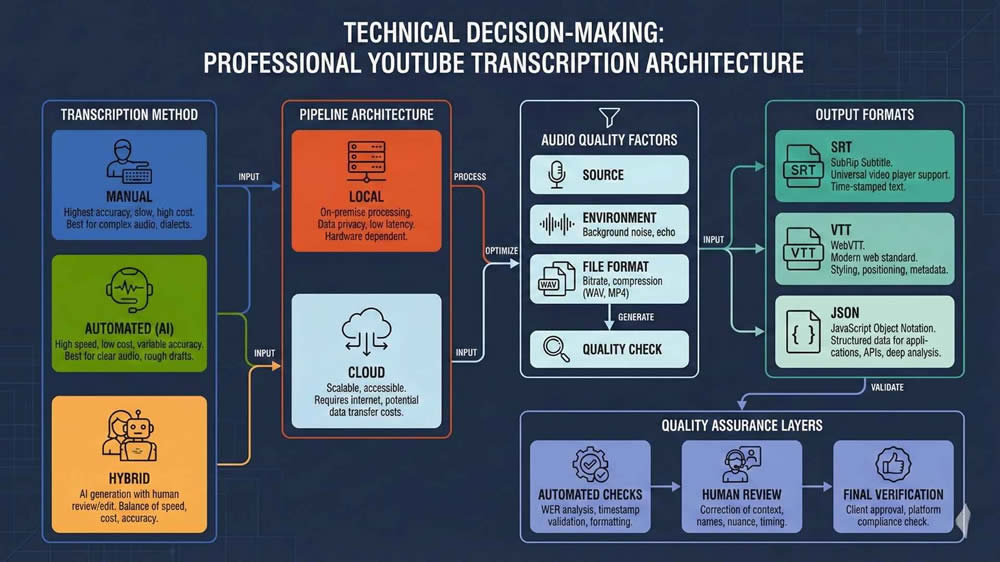
Choosing between local and cloud transcription depends on control, cost, and security requirements. For projects involving sensitive or proprietary content, I often run transcription locally using Whisper on GPU machines. This gives me full control over data residency, avoids API throttling, and eliminates variable cloud costs. It also allows me to tune decoding parameters for specific accents or pacing.
Cloud solutions, on the other hand, provide scalability and pre-optimized infrastructure. Platforms like Google, AWS, and AssemblyAI allow me to batch large volumes, leverage pretrained models, and access features like speaker diarization and confidence scores. When working with teams that lack local infrastructure, the cloud is often the only viable path.
Scaling, Storage, and Latency
Scaling is not just about compute; it’s about I/O, storage throughput, and latency. For local processing, I stage input files on SSDs and cache models on GPU memory to minimize reloading overhead. For cloud processing, I batch files into groups and handle retries with exponential backoff to avoid rate limits.
Storage systems like Amazon S3 or Google Cloud Storage allow durable, scalable file management, but they add cost and delay. In time-sensitive projects, I avoid uploading large source files when I can process them locally. Ultimately, deployment choice depends on the client’s risk profile, volume forecast, and required turnaround time.
Quality Assurance and Post-Editing
QA Techniques and Tooling
No matter how good the ASR engine is, I never deliver transcripts without QA. The QA process involves visual and audio alignment checks, style consistency validation, and automated formatting audits. Tools like Gentle, Aeneas, and custom Python scripts help align transcripts with audio after the fact, particularly when exact timecodes are required.
For editing, I sometimes use platforms like Descript or Sonix when collaboration is needed. These tools let editors work directly with waveform visualizations and mark issues for review. In other cases, I export the text into Google Docs with tracked changes or bring it into a version-controlled markdown environment. The tooling depends on the client’s preferences, but the underlying principle is the same: verify, validate, and document.
Linguistic and Technical Validation
There are two QA streams in every project: linguistic and technical. Linguistic QA focuses on grammar, terminology, tone, and coherence. Technical QA focuses on timecode alignment, format integrity, and file structure. I separate these workflows so that language experts are not bogged down in technical issues, and engineers are not editing comma splices.
To support this, I built internal QA checklists. A few key items include:
- Timecode drift detection
- Maximum character-per-line checks
- File encoding validation (UTF-8 without BOM)
- Presence of required metadata (language, version, author)
Structured QA helps scale quality without sacrificing throughput.
Exporting and Deliverables
Format-Specific Packaging
Exporting is not just a matter of saving the file. I ensure that the output matches the downstream system’s requirements. For example, SRT files for YouTube need clean formatting, while VTT files for HTML5 players may include styling tags. JSON exports for training data often require millisecond-precision timestamps and speaker labels in a nested schema.
I also check encoding settings (e.g., UTF-8 vs UTF-16), file extensions, and line endings, especially when delivering to clients working across operating systems. A small encoding mistake can cause hours of debugging if not caught before delivery.
Deliverable Organization and Archiving
For enterprise clients, I standardize deliverable packaging. This usually includes:
- One folder per video, named using a stable slug or ID
- Subfolders for source audio, raw transcript, cleaned transcript, and captions
- Metadata file with transcript style, language, model used, and timestamp
I compress deliverables into versioned zip files and store backups for at least 90 days unless specified otherwise. Deliverable discipline may seem tedious, but it enables smooth handoff to downstream teams in localization, publishing, or ML training.
Integration with Post-Production and CMS
Video Editing Platforms
If the transcript feeds into a post-production pipeline, integration with software like Adobe Premiere or DaVinci Resolve becomes important. Most NLEs (non-linear editors) accept SRT or VTT caption files, but timing precision and formatting affect readability and sync. I test subtitle imports in the target editing software before delivery.
For subtitled videos, I sometimes provide burnt-in caption previews so editors can visually check placement before final renders. These small touches reduce round-trips and help catch errors before publication.
CMS and Publication Workflows
For content intended for web platforms, I ensure transcript formats are compatible with CMS import requirements. WordPress plugins, video hosting services like Brightcove, or e-learning platforms like Kaltura often have their own standards. I’ve built scripts that wrap captions in structured HTML or generate XML manifests to streamline CMS integration.
I also work with clients who use Git-based content repositories. In these cases, I format transcripts in markdown and embed metadata in YAML headers. This makes them easy to diff, version, and reuse across web properties.
Security and Enterprise Considerations
Data Protection and Access Control
Security matters, especially when dealing with pre-release media, confidential recordings, or medical/legal content. I always apply encryption at rest and in transit. For cloud storage, I enforce role-based access control and expiration policies on public links.
When collaborating with remote editors, I avoid sending raw audio or transcripts over email. Instead, I use secure file transfer platforms or document management systems with granular permissions. Security needs to be a first-class concern, not an afterthought.
Compliance and Auditing
For clients in healthcare, finance, or government, compliance is non-negotiable. I ensure that transcription tools and platforms comply with HIPAA, SOC 2, ISO 27001, or other relevant standards. This includes reviewing vendor documentation and contracts before engaging their APIs.
I also maintain audit logs for transcription jobs. These logs include file hashes, processing timestamps, model versions, and QA results. This documentation allows clients to demonstrate chain-of-custody or prove that sensitive material was handled according to policy.
Final Thoughts
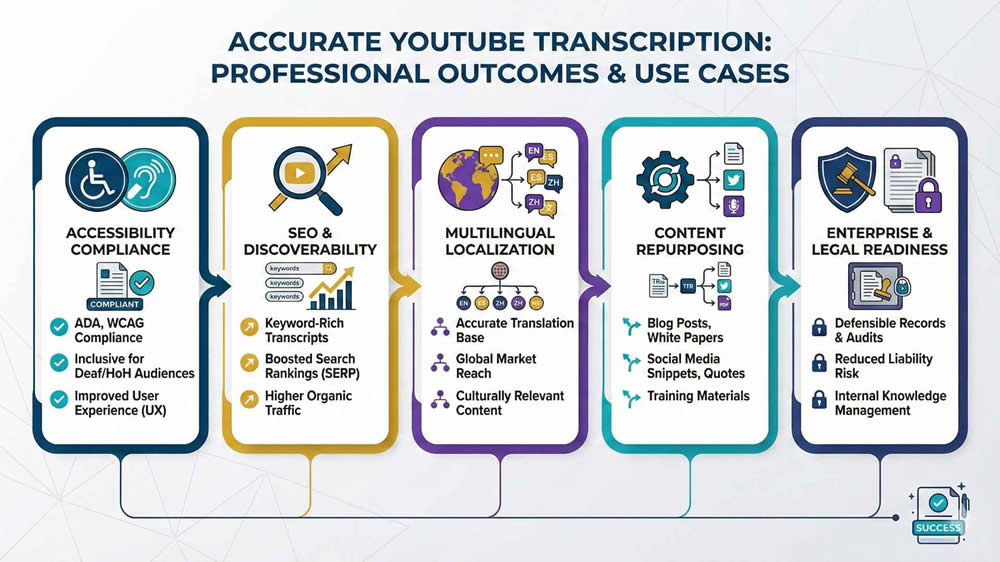
Professional transcription is a discipline, not just a task. When handled correctly, it becomes a foundation for content reuse, accessibility, training, and publishing. The workflows I’ve described here are based on years of experience designing systems for scale, compliance, and precision. They are built to survive client audits, team turnover, and platform evolution.
Whether you’re transcribing one video or ten thousand, the principles are the same. Define requirements early, choose the right tools, validate everything, and deliver in formats the next team can actually use. That’s how transcription stops being a bottleneck and starts becoming an asset.
About LocalEyes
At LocalEyes, transcription supports distribution, compliance, and engagement, not just accessibility. With 3,900+ completed projects and an Emmy Award-winning team, the company manages every stage of the content lifecycle. Accurate, structured transcriptions and captions are integrated into publishing, localization, and SEO strategies to strengthen performance.
Producing testimonial, corporate, educational, and promotional content at scale requires transcription precision. From complex interview audio to multilingual explainers, workflows are built to maximize clarity and reach. With nationwide offices and enterprise-level systems, LocalEyes delivers both production quality and scalable content infrastructure.
If you’re looking for a partner that can not only produce your videos but also ensure they are transcription-ready, caption-compliant, and globally scalable, let’s talk.

Founder at LocalEyes Video Production | Inc. 5000 CEO | Emmy Award Winning Producer